· Jakub Dvořák · 9 min read
What's new in JOBSON 3 for agencies in Czechia and Slovakia: sales CRM, customer orders, payslips from PDF and bank payment matching
Track company requests under Sales, see on each order how many people the customer is still missing, let JOBSON read payslips from one PDF and send them out, and match bank payments with invoices. An overview of the JOBSON 3 release of 27 October 2026 for staffing agencies in Czechia and Slovakia.
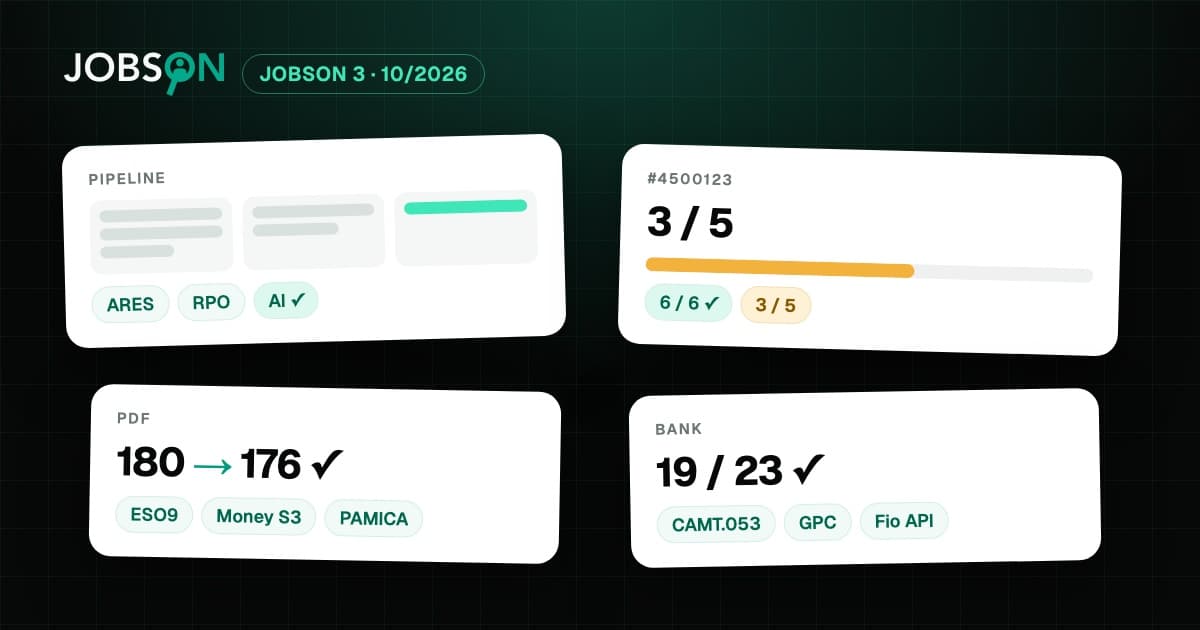
A manufacturing company calls: from Monday it needs five people for the night shift. The sales rep writes it down in a notebook, the coordinator counts in a spreadsheet how many people are already there, and at the end of the month payroll splits a PDF with 180 payslips while the accountant ticks off the bank statement. Since 27 October 2026 it all connects in JOBSON 3: request, order, recruitment, payslips and payments.
Here is an overview of the release for staffing agencies in Czechia and Slovakia: four main additions, what each one brings and how to start, followed by further improvements.
Does JOBSON have a CRM for staffing agencies?
Yes, a simple sales CRM on top of your customers. Under Sales you track company requests in a pipeline, stage by stage from first contact to won. Each opportunity has headcount, monthly value, probability and a next step with a due date. A won request becomes a customer, contract, site with positions, order and recruitment vacancies in one guided flow, without retyping.
- Stages your way: you create the pipeline from a template (New contact, Meeting, Offer, Negotiation, Won, Lost) and can rename or reorder the stages. You drag opportunities between stages on the board.
- Company from the register: for a company that is not yet a customer, name and registered office are filled in from ARES, for Slovak companies from RPO.
- Request forms: AI suggests the requested positions from an uploaded form (PDF, DOCX or photo) for 2 credits, and you confirm each position.
- Outlook and reports: weighted outlook by month, conversion between stages, time to win and lost opportunities by reason.
- Contact log and tasks on the opportunity and on the customer. On conversion they move to the customer.
Sales is optional, and only users allowed to manage billing terms see the amounts in it. More in the Clients and sites module.
How can a staffing agency keep track of customer orders for people?
In JOBSON 3 you create an order on the customer with the customer's order number and period, and add lines to it: position, headcount, period, weekly hours and shifts. For each line JOBSON calculates the fill rate, for example "3 of 5", and shows it on the order, on the customer and in the overview of all orders. From a line you create a recruitment vacancy in one click, and whoever starts through it is counted towards the order automatically.
- Order or recruitment vacancy: the order says what the customer has ordered. The recruitment vacancy says whom the agency is recruiting right now. A vacancy created from a line takes over the site, the position and the number of people still missing.
- Assignment to a line: when you assign a person, you choose the order line. If there would be more people than the customer ordered, or the assignment would fall outside the period, JOBSON warns you.
- End of an order: when the customer withdraws an order, you end it as of one day together with the linked assignments.
- User contract: in the order you prepare the agreement on temporary assignment with the client under Section 308 of the Czech Labour Code from a sample template that you adapt. Optionally JOBSON warns three days before the start if a handed-over contract is missing. You add the comparable working and pay conditions to the agreement yourself.
Orders are optional; without them invoicing and payroll inputs work as before. If you want an order for every start, switch on the option "Assignment requires an order". More in the Clients and sites module.
How can a staffing agency send payslips to its employees quickly?
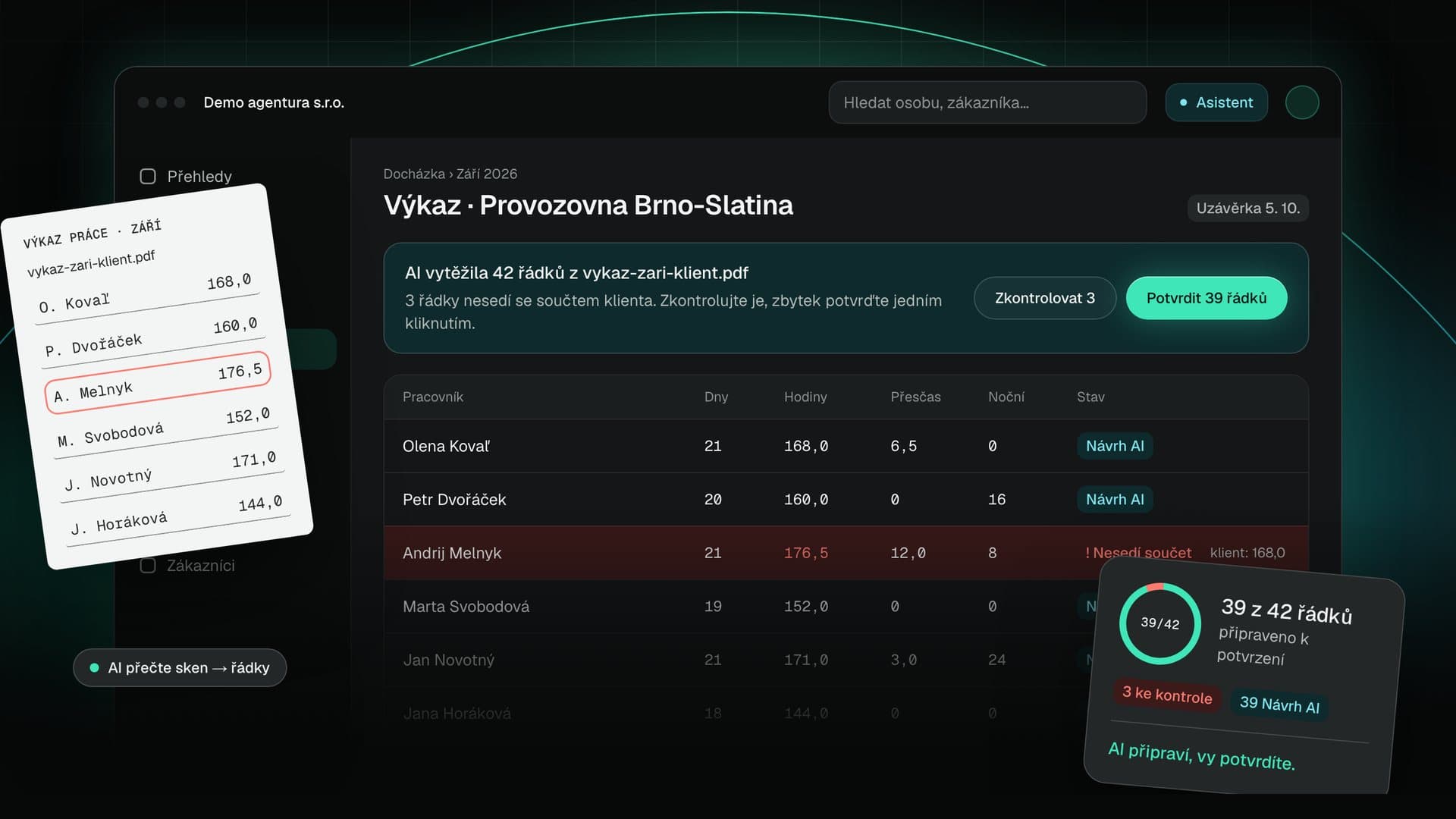
In JOBSON 3 you upload one PDF with all payslips from your payroll software. JOBSON reads it, splits it per person, matches each payslip by name to an employee with an employment in that month and leaves uncertain cases to you. After your check it sends the payslips with one button: people who use the JOBSON mobile app find the payslip there, everyone else receives it by e-mail as a password-protected PDF.
- Payroll software: JOBSON reads payslips from the Czech programs ESO9, Money S3 and PAMICA for free, without AI. PAMICA prints two payslips per page, and each person receives only their own. Payslips from other software are read by AI for 1 credit per page, and you see the price in advance.
- Leave and average earnings: JOBSON also reads leave (entitlement, taken and remaining) and average earnings used for wage compensation from the payslips. It stores the average earnings with each person if you tick this when uploading.
- Password: the PDF password is the employee's date of birth in the format DDMMYYYY. The password itself is not in the e-mail.
- Who can see payslips: only users with the payslip permission, by default the agency administrator and the payroll accountant. Payslips stay on the employee's record in JOBSON.
- Nothing leaves without a check: you can also just store the payslips and send them later.
JOBSON does not calculate pay. Your payroll software calculates the payslip, JOBSON reads it, splits it and delivers it. More in the Payroll inputs module.
How can bank payments be matched with invoices automatically?
JOBSON 3 imports the statement of the agency's bank account and matches incoming payments with customer invoices and outgoing payments with expenses. When the variable symbol or invoice number and the amount match, it records the payment itself. Partial payments, overpayments and one payment for several invoices are prepared as suggestions for you to confirm.
- Formats: CAMT.053 (XML) and GPC (ABO). JOBSON detects the format itself.
- How statements arrive: by file upload, by e-mail to the agency's own address, or for Fio banka via its API with a read-only token. Fio transactions are fetched once an hour.
- No duplicates: the same transaction is imported only once and a payment is never recorded on an invoice twice. Every match can be undone.
A paid invoice shows up straight away in revenue and in the cash flow outlook. More in the Finance and invoicing module.
What else is new in JOBSON 3?
- Applications from Jobs.cz, Prace.cz and Profesia in one system: you forward the portals' notifications to the agency's address with a mailbox rule, and JOBSON creates applicants from them with source, contact details and the CV from the attachment. Recognising a notification costs no credits. More in the Recruitment module.
- Validity of forklift licences and other qualifications: every person has qualifications with a validity date, and matching on a vacancy checks whether they are valid on the start date. AI suggests education, work experience and qualifications from the CV. More in the Person database module.
- Full data export: the agency administrator can download the whole agency as a ZIP at any time, in JSON and CSV, with documents and a README. Your data is not locked in.
- Two records of the same person can be merged into one, with the full history.
- App invitations and SMS go out in each person's language: Czech, Slovak, English, Ukrainian, Polish or German.
- A fixed-term employment can be extended together with its assignments in one step.
- Received e-invoices in ISDOC, ZUGFeRD and XRechnung are read into expenses for free, without AI. Invoices and expenses can be exported to POHODA and Money S3.
- VAT rates follow the date of supply, also when correcting an older invoice.
You can try payslips in the sample agency that every new account gets, with sample PDFs. Through the AI assistant you ask in one sentence, for example "Which customers are short of people according to their orders?" or "Which bank payments are still unmatched?" The assistant only writes after you confirm.
Frequently asked questions
How does Sales in JOBSON differ from a regular CRM?
It is connected to the rest of the agency. A request carries the requested positions with shifts, working hours and pay conditions, and once it is won it becomes a customer, an order and recruitment vacancies. It does not import e-mails into the CRM on its own: the AI assistant records a forwarded request as an opportunity after you confirm. Sales does not cover marketing campaigns.
Do I have to use orders in JOBSON?
No. Orders are optional, and without them everything works as before. They suit agencies whose customers send orders for people under a framework agreement. If you want an order for every start, switch on the option "Assignment requires an order".
Does JOBSON calculate payslips?
No. Pay and payslips are calculated by your payroll software or payroll accountant. JOBSON prepares gross pay from attendance as input, and then reads the finished payslips, splits them per person and sends them to employees.
Which payroll programs can JOBSON read payslips from?
For free and without AI from ESO9, Money S3 and PAMICA. Payslips from other software are read by AI for 1 credit per page, with the price shown before reading. More programs are in preparation based on agencies' interest.
Can an employee receive someone else's payslip?
JOBSON assigns a payslip on its own only when the name matches exactly one person with an employment in that month. A match with two people or an unknown name is decided by a person. An unmatched payslip is neither stored nor sent.
Does an employer have to issue a payslip, and may it be sent electronically?
In Czechia, Section 142(6) of the Czech Labour Code requires the employer to issue, with the monthly pay settlement, a document showing the individual components of pay and the deductions. Employers usually arrange electronic delivery through an internal regulation or with the employee's consent. In Slovakia, an electronic payslip is possible after prior agreement with the employee. Check the details with a lawyer or your payroll accountant.
Does JOBSON connect directly to my bank?
Directly via API to Fio banka. Other banks are connected by sending statements by e-mail or by uploading a CAMT.053 or GPC (ABO) file.
Does JOBSON check that a person has a contract with the client before starting?
Once you switch on the option "Assignments require a user contract before the start", JOBSON warns three days before the start for whom a handed-over or signed contract is missing. It does not block the start. It does not send the contract to the client or have it signed; you record the handover yourself.
Is JOBSON connected to job portals?
It takes over applications from Jobs.cz, Prace.cz, Profesia.sk, Indeed, StepStone and Jobbörse from the notification e-mails that you forward to the agency address with a mailbox rule. It does not publish job ads yet.